Showing posts with label Laptop. Show all posts

Sebanyak 4.484 komputer jinjing mini dirakit oleh 700 siswa sekolah menengah kejuruan (SMK) negeri dan swasta di Surabaya, Jawa Timur. Komputer jinjing mini ini selanjutnya didistribusikan ke SMK negeri dan swasta di Jatim pada Januari 2011.

Beberapa kepala sekolah menengah kejuruan (SMK), seperti dari Kabupaten Malang dan Bojonegoro, Senin (17/1/2011) kemarin, terlihat mengambil komputer jinjing mini yang diadakan Direktorat Pembinaan SMK Kementerian Pendidikan Nasional di SMK Negeri 2 Surabaya.

Perakitan dilakukan oleh 400 siswa SMKN 2 Surabaya dan siswa SMK negeri dan swasta lainnya bersama-sama pada Pameran SMK di Jatim Expo Surabaya, akhir November 2010. Sebelum diserahkan, komputer jinjing mini dicek ulang oleh tim yang terdiri atas 12 siswa kelas X SMKN 2 Surabaya didampingi oleh Hary Subagio, kepala program teknologi informatika sekolah tersebut.

”Sesungguhnya sudah ada beberapa pengecekan awal, tetapi kontrol terakhir ini untuk meyakinkan karya siswa SMK memang bisa digunakan. Lagi pula, ini sekaligus untuk pembelajaran siswa,” tutur Hary.

Kepala SMKN 2 Surabaya Bahrun menambahkan, dari 4.484 komputer jinjing mini itu, 340 unit diberikan kepada 78 SMK negeri dan swasta di Surabaya serta sisanya didistribusikan kepada 898 SMK negeri dan swasta di luar Surabaya.

sponsored link:

Distribusi komputer jinjing mini untuk sekolah-sekolah di luar Surabaya hampir rampung pekan ini. Setiap SMK mendapatkan empat komputer jinjing mini dengan prosesor Intel 1,66 GHz, perangkat keras (hard disk) 250 GB, memory 1 GB-DDR 3, perangkat baca kartu 8 in 1 card reader (MMC/RSMMC/SD).

Sebagai pemrakarsa perakitan komputer jinjing mini terbanyak oleh 700 siswa SMK negeri dan swasta di Surabaya akhir November lalu, SMKN 2 Surabaya mencatatkan diri dalam rekor Museum Rekor-Dunia Indonesia (Muri).

Kepala SMK PGRI Pakis Haji Kabupaten Malang Guswan Effendy mengatakan, sekolahnya akan memanfaatkan empat komputer jinjing mini ini untuk pembelajaran. Apalagi, sekolahnya memiliki LCD. Kepala SMK Islam Donomulyo Kabupaten Malang Imam Safi’i, mengatakan, pihaknya akan mengoptimalkan penggunaan komputer di sekolah dalam pembelajaran siswa.

-KOMPAS.com
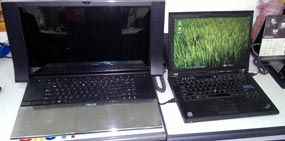
Asus telah merilis sebuah notebook dengan dimensi cukup besar. Produk ini juga memiliki desain, serta fitur yang diklaim membuatnya layak disebut sebagai komputer jinjing multimedia terbaik dengan desain unik.
Penampilan yang Serba Waahh..

Perbandingan NX90 dengan notebook 14 inchi
Asus NX90 memiliki tampilan yang serba wah. Mulai dari ukurannya, desain, hingga bahan yang digunakan membuat setiap orang yang melihatnya begitu penasaran dengan notebook ini. Ketika dibuka, wow.. layarnya widescreen dengan rasio 16:9 berukuran 18,8 inchi ini, dikepung dua buah speaker besar. Oke, sekarang mari kita ulas satu persatu 'anggota tubuh' produk ini.

Dari luar, tampilan NX90 memang cukup unik karena didominasi oleh bahan almunium yang berkilau. Asus sendiri mengklaim bahwa produk ini adalah satu-satunya notebook yang menggunakan bahan seperti yang telah disebutkan di atas.


sponsored link:

Selain berbahan almunium dengan krom, yang membedakan produk ini dengan kebanyakan notebook lain adalah penempatan touchpad hingga 2 buah. Ya, Asus NX90 memiliki satu buah touchpad di sebelah kanan dan satu lagi di sebelah kiri dengan ukuran yang sama. Entah apa kegunaan touchpad kedua pada produk ini.

Meski berbalut almunium, namun NX90 tidak terasa panas meski digunakan seharian. Hebatnya lagi, kipas pendingin pun hampir tidak terdengar. Sunyi, namun sangat efektif mengusir panas.

Asus merancang keyboard NX90 dengan cukup jeli. Tampilannya begitu selaras, serta dilengkapi beberapa tombol tambahan seperti volume, pengatur tingkat kecerahan layar, tombol power, dan tombol untuk mengeluarkan kepingan DVD/Blu-Ray.


Hal unik lainnya adalah, penempatan dua sisi speaker yang berada pada tepian layar. Jelas sekali Asus coba menonjolkan kualitas audio NX90. Apa lagi ada embel-embel Audio by Bang & Olufsen ICEpower pada bagian sudut kiri atas.

ICEpower sendiri merupakan penyedia amplifier yang fokus pada musik akustik. Kerjasama Asus dengan Bang & Olufsen ICEpower menciptakan sebuah standar audio baru di ranah notebook yang bernama SonicMaster technology, yang konon sangat merdu untuk mendengarkan lagi bernuansa klasik, orkestra, dan pastinya akustik.


Performa Audio dan Video

Setelah cukup puas dengan dengan tampilannya, kini saatnya menguji performa Asus NX 90. Produk ini memiliki spesifikasi yang tergolong mewah, misal Intel Core i7 720QM, memory DDR3 6GB dan kartu grafis Nvidia GeForce GT 335M.

Menjalankan film High Definition (HD) pastinya bukan masalah besar bagi produk ini, begitu pun ketika digunakan untuk olah gambar dan video. Asus NX 90 mampu melakukannya dengan sangat mudah tanpa ada masalah. Lantas bagaimana dengan game?

Untuk menguji seberapa jauh kemampuannya, detikINET memainkan beberapa game seperti CoD Black Ops dan Spider-Man: Shattered Dimensions. Khusus untuk Black Ops, tampaknya Asus NX90 tampaknya cukup kewalahan untuk memainkannya, sedangkan Shattered Dimensions dapat dilahapnya dengan mudah meski di resolusi tinggi sekali pun.

Lalu bagaimana dengan performa audio yang dibanggakan? Seperti telah dijelaskan sebelumnya bahwa ICEpower jagonya mengolah musik akustik, begitu pun dengan kemampuan Asus NX90. Ketika digunakan untuk memutar lagi klasik, orksestra, atau klasik kualitasnya begitu menakjubkan.

Suara yang keluar terdengar sangat detail, dengan kedalaman yang cukup baik. Ditambah lagi keluaran stereo yang begitu presisi, bisa membawa penggunanya seakan tengah berada di dalam acara konser.

Namun berbanding terbalik jika untuk mendengarkan musik Jazz, atau ajeb-ajeb yang banyak didominasi oleh suara bass. Reproduksi nada rendah pada notebook ini sangat buruk, terdengar cempreng dan kurang bertenaga. Namun cukup dimaklumi mengingat Asus NX90 memang tidak rancang untuk jenis musik tersebut.

Urusan film, keluaran suaranya terdengar cukup baik. Terutama pada bagian percakapan, dan dibeberapa adegan lainnya. Meski demikian, tidak dipungkiri jika efek ledakan terdengar serta suara lain dengan nada rendah terasa kurang enak didengar. Sedikit mengecewakan, mengingat produk sudah memiliki spesifikasi yang luar biasa.


Kesimpulannya, sebagai laptop multimedia performa Asus NX 90 memang sedikit mengecewakan. Selain keluaran suara yang kurang enak di dengar untuk film, layar yang digunakan pun terlihat mudah memantul gambar. Terlebih lagi produk ini juga memiliki contrast rasio sebesar 288:1, hampir 3 kali lipat lebih kecil dari kebanyakan LCD yang beredar.

Namun di balik itu, spesifikasi yang ditawarkan memang tergolong mewah dan mampu menangani aplikasi terberat sekali pun dengan mudah. Dan yang tidak bisa dipungkiri adalah, kualitas audio (akustik) yang begitu memposona. Tertarik memilikinya? Penguna harus terlebih dulu merogoh kocek cukup dalam. Karena Asus NX90 dibanderol USD 2.609 atau sekitar Rp 23 Juta-an.

Kelebihan:
+ Spesifikasi kelas atas
+ Suara akustik mantab
+ Penampilan unik

Kekurangan:
- Harga mahal
- Kualitas layar kurang baik
- Berat Spesifikasi:
  • Prosesor: Intel Core i7-720QM 1,6Ghz
  • RAM: 6 GB
  • Kartu grafis: NVIDIA GeForce GT 335M
  • Layar: 18,4 inchi, 1920 X 1080 pixel
  • Hardsik: 2 X 640GB
  • Dimensi: 530 x 275 x 43 mm
  • Bobot: 4,4 Kg


detik.com

VIVAnews - Akhir Agustus lalu Intel meresmikan kehadiran prosesor dual core pertama mereka yang didesain khusus untuk platform netbook yakni Atom N550. Prosesor itu merupakan prosesor dual core Atom pertama yang ditujukan untuk netbook.


Bersamaan dengan hadirnya prosesor tersebut, Intel menyebutkan sejumlah partner mereka langsung mengirimkan produk-produk netbook mereka yang memanfaatkan Atom N550 ke pasar. Salah satunya adalah Asustek dengan netbook seri Eee PC 1015PEM.

Desain dan Spesifikasi
Dari sisi desain, Netboook Eee PC 1015PEM ini serupa dengan Eee PC 1015PE yang sudah lebih dulu hadir di pasaran. Netbook ini juga menggunakan casing berbahan plastik matte dan keyboard berdesain chicklet.

Keyboard dengan desain seperti ini memudahkan mereka yang memiliki jari berukuran di atas rata-rata agar tidak terpeleset menekan tombol yang ada di sebelah tombol yang ia maksud. Sayangnya, beberapa tombol yang ada memiliki ukuran yang kecil hingga tetap memunculkan risiko salah pencet.

sponsored link:

Untuk menggerakkan kursor, Asus menyediakan touchpad berukuran 7,6 x 4 sentimeter. Cukup luas untuk sebuah netbook. Untuk mengklik, meski tidak ada tombol kiri dan kanan, karena keduanya menyatu menjadi sebuah tombol, Anda tetap dapat mengklik seperti biasa. Berikut ini spesifikasi singkat Asus Eee PC 1015PEM.

Prosesor : Intel Atom N550 1,5GHz, 1MB cache
Chipset : Intel NM10 Express chipset
Memori : DDR3 1GB
VGA : Intel GMA 3150
Layar : 10,1 inci 1024x600 LED Backlight
Harddisk : 160GB, 2,5” SATA 5400rpm
Sound/speaker : Integrated stereo speaker, HD Audio CODEC
Drive optik : -
Baterai : 6 cell Lithium Ion hingga 13 jam
Konektivitas : WiFi, Gigabit LAN, Bluetooth
Port eksternal : VGA, RJ-45, Mic/Headphone, 3 USB 2.0, card reader
Dimensi : 262 x 178 x 23,6-36,4 mm
Bobot : 1,27Kg (dengan baterai 6 cell)
Sistem operasi : Windows 7 Starter Edition
Garansi : 1 tahu

Fitur
Eee PC 1015PEM memiliki kelengkapan yang sama seperti netbook pada umumnya. Port VGA dan sebuah port USB di sisi kiri dan dua buah di sebelah kanan memungkinkan pengguna untuk menghubungkan USB modem atau harddisk eksternal sambil tetap mengisi ulang baterai ponsel dan MP3 player, misalnya.

Asus Eee PC 1015PEMUntuk melakukan video conference, Asus menyediakan kamera 0,3 megapiksel di bagian atas layar. Yang menarik, ada ‘pintu’ geser di depan lensa kamera. Ini cukup bermanfaat untuk memastikan bahwa kamera tidak akan menangkap basah pengguna saat ia sedang tidak siap.

Netbook ini juga memiliki fasilitas yang disebut Express Gate. Fitur tersebut merupakan aplikasi ‘instant-on’ berbasis sistem operasi Linux yang dapat langsung digunakan sekitar 5 detik setelah tombol ditekan. Jika pengguna hanya butuh untuk menjelajah internet, chatting, berkomunikasi lewat Skype, cukup menekan tombol di sudut sebelah kiri untuk mengaktifkan fitur ini. Adapun jika ingin masuk ke dalam sistem operasi Windows 7, tombolnya ada di sudut sebelah kanan.

Uji Kinerja
Menggunakan fitur Express Gate, tak sampai 10 detik kami dapat langsung menjelajah internet. Sayangnya, saat kami coba menjelajah, kami perlu menghubungkan kabel ethernet ke port LAN. Tidak dapat memanfaatkan fasilitas WiFi.

Asus Eee PC 1015PEMDari sisi kinerja, prosesor dual core yang digunakan, meski memiliki clock yang lebih rendah yakni hanya 1,5GHz membuat aplikasi dan sistem lebih responsif saat dijalankan.

Lewat aplikasi RightMark CPU Clock Utility, tercatat bahwa baterai pada netbook ini memiliki kapasitas penuh sebesar 56.305mWh. Jika digunakan secara terus menerus, aplikasi memperkirakan baterai dapat bertahan hingga 5 jam 26 menit.

Uji coba masa pakai baterai kami lakukan menggunakan aplikasi Imtec Battery Mark. Saat diuji dan dengan mengaktifkan CPU load, baterai tercatat dapat bertahan selama 4 jam 46 menit.

Asus Eee PC 1015PEMDari percobaan singkat yang kami lakukan, Asus Eee PC dengan prosesor dual core ini bisa kami rekomendasikan bagi Anda yang mencari komputer jinjing ringkas, dengan prosesor yang agak lumayan dari sisi kecepatan. Baterai yang dapat bertahan hingga 5 jam atau lebih, tergantung cara pakai netbook, juga lumayan.

Di Indonesia, netbook ini akan dipasarkan dalam tiga pilihan warna yakni hitam, putih, merah, dan biru di kisaran harga US$440 atau sekitar Rp3,89 jutaan.

Kelebihan
- Prosesor dual core, kinerja lebih baik
- Baterai cukup awet

Kekurangan
- Beberapa tombol berukuran lebih kecil, kurang nyaman saat dipakai


KOMPAS.com — Indonesian Acer Aspire One launches new netbook, Aspire One D 255, which offers new technology, Intel Atom N550, Dual-Core processor. Netbook offers better performance with the use of a faster processor technology and unlimited information access.

"Aspire One netbook D 255 is the first to use Dual-Core Atom. Developed specifically uses a sleek new design and is equipped with the right color choice for the modern mobile lifestyle," said Riko Gunawan, Brand Manager of Acer PCs, the launch of Aspire One D 255, Monday (30/08/2010) in Jakarta.

Expresses, the latest technology embedded in the Aspire One D255 allows the user to the level of support for applications such as games and Adobe Flash technology to access web pages and multimedia. In addition, with the Intel Atom N550 Dual-Core Processor, this technology allows users to access HD video streaming faster and longer battery life.

sponsored link:

"There are five color options, namely Aquamarine Blue, Ruby Red, Sea Shell White, Sandstone Brown, and Black Diamond," he said.

He explained also, in addition to performing Intel Dual-Core Atom Processor N550, D255 Aspire One that has a size of more than one inch thin, it offers a dual operating system loads, ie with Windows 7 Starter and Android IntantOn. Android operating system offers Internet access and connectivity options are more convenient for those who have high mobility.

"For Windows 7 Starter and Android InstantOn priced USD 3.5 million, while Linux is subject to a price of Rp 3 million."

Added by Jason Lim, President of Acer Group of Indonesia, in equal opportunities Aspire One D 255 became available in the PC market at the same time with the availability of Intel Atom Dual-Core Processor. "This demonstrates Acer's commitment to offer only the latest technology for PC users," he asserted.

If hp-G50 AC Series Laptop Computer PC Replacement Charger damaged; analyze few tips As here

Ac adapter consists 2 units. solid block Power supply Charger , 3pin power cable goes in Wall socket, it's thinkable that the brick Power Supply could be defective or Power Cable could be . When wire can be needs repair simply change by another cable easily, you may purchase another Three Pin or Two Pin wire suitable Charger Pattern.

Few Times it is likely that, Power Supply it's . When it's the status, customers should acquire new Power Cord for your Pavilion G50 AC'' ; When ever you Purchase Ac adapter from nbbatt, you get another unit no cost to you 1 year time period.

It could be possible due to current fluctuations. Power Supply produced by specific surge protector which will turn off the Power Supply to prevent damaging yours notebook.

In such case, just detach the Power Cord from laptop and also from Electric board also takeoff , detachable cable from brick charger and again reconnect it then laptop computer will be commence running again.

Make sure that you observe the Pin connecter of the ac adapter before taking.

Image of hp G50 AC'? Power Cord you might observe a Hp G50 AC'? Ac adapter,

Input - 100 - 240Volts- 50 - 60Hz
Power Out - 18.5V , 3.5A
Current Wattage - 65.00w
Amperes - supports 3.5amp - means 2.4a , 2.74A / 3.5A

Purchasing one on online is effortless at NbBatt.com. We have Qualified expert people servicing numerous'? repair shops. Servicing customers since 2001. We have skilled team they can helpful you with your laptop computer ac adapters components, We offering 12 months replacement warranty Parts NbBatt.com supply. if Ac adapter may be malfunctioning we quick replace with new one. Returning back is effortless with nbbatt.com

MacBook Air Supreme Ice Edition
Laptop ini dilapisi platina dan 53 berlian.


Desainer gadget asal Liverpool, Inggris, Stuart Hughes meluncurkan rancangan muka komputer jinjing MacBook Air Supreme Ice Edition. Laptop mewah ini dibanderol senilai US$ 207.900 atau sekitar Rp 1,88 miliar.

Bagian depan MacBook Air Supreme Ice Edition ini dilapisi platina sementara bagian lainnya ditutupi aluminium mengilap untuk mendapatkan efek seperti es yang berkilau. Bagian logo Apple ditutupi 53 berlian IF (internally flawless) 25,5 karat.

Komputer portabel ini berbobot 2,5 kilogram. Namun dalam laman resminya, Stuart Hughes tidak menjelaskan spesifikasi MacBook yang hanya dibuat sebanyak sepuluh unit ini.

Sebelum merancang MacBook Air Supreme Ice Edition, Hughes telah mendesain tampilan luar sejumlah gadget seperti Nokia seri Diamond, iPhone 3G Supreme Rose, dan seri BlackBerry Diamond.
Vivanews.com

VIVAnews - IBMI (International Branding Marketing Inc) baru-baru ini memperkenalkan modul-modul Nanya Elixir DDR3 1133 SO-DIMM 2GB dengan penyerap panas terintegrasi. Produk memori anyar ini cocok ditujukan bagi para konsumen personal dan gamer yang ingin menghemat konsumsi daya.

Seri modul-modul SO-DIMM tanpa-buffer Nanya Elixir DDR3 telah diuji dalam platform motherboard dari semua pabrikan merek-merek ternama seperti Asus, Gigabyte, MSI, ECS, dan beberapa lainnya. Tak hanya itu, SO-DIMM Nanya seri ini juga menunjukan stabilitas yang tak biasa sehingga unggul dalam karakteristik kinerja, terlebih lagi untuk sistem operasi Windows 7, yang menjalankan game atau hanya sekedar menggunakan aplikasi sehari-hari.

"Seiring dengan turunnya harga modul-modul DDR3 dalam beberapa bulan terakhir, pengguna PC berkekuatan besar dan overclocker yang ingin meningkatkan sistem mereka ke tingkat ekstrim sekarang memiliki lebih banyak pilihan," papar IBMI, yang merupakan perwakilan penjualan eksklusif Nanya-Elixir DRAM di Indonesia, Vietnam, Filipina, dan Singapura, dalam keterangan persnya yang dikutip VIVAnews.

"Jika pengguna biasa mungkin tak terlalu membutuhkan disipasi panas khusus, namun para penggemar overclocking akan tertarik pada penyerap panas yang telah terpasang. Karena itu, seri SO-DIMM Elixir untuk notebook kini hadir dengan atau tanpa penyerap panas, tersedia dalam versi 1066, 1333 dan 1600 MHz," katanya.

Disiarkan VIVAnews sebelumnya, Elixir DDR3 SODIMM menggunakan chip DDR3 2Gbit 50nm dari Nanya, yang ditawarkan dengan kapasitas densitas hingga 4GB, dan sepenuhnya kompatibel dengan kebutuhan ekspansi notebook saat ini dan yang akan datang.

Di Indonesia, IBMI berafiliasi dengan grup Kingmax, sebuah penyedia memori terkenal yang menawarkan solusi-solusi memori dengan cakupan luas. IBMI mengkhususkan diri pada manajemen merek, dan pemasaran channel, bertanggung-jawab untuk merek Elixir di Indonesia.


We all know that technology waits for no one in this day and age, and whether you use a computer or laptop for leisure or business it is a natural urge to want to keep up with the times. This can become an expensive habit, however there are ways to reduce the costs involved and benefit from your old laptops and PC´s. Being able to trade your laptop online, quickly and easily allows you to use the funds you receive to discount the cost of your upgrade.

There are a few things that you should be aware of when you trade a laptop, firstly is that the process to trade your laptop online is now so quick and simple that to sell privately would seem a long winded and stressful process. With this said there are many sites available and we have to be sure that the site we choose to trade with is the best option for ourselves, so how do we do this?

Firstly, we need to have confidence in the company we are going to trade our laptop with; we are never going to meet face to face, so we have to know they are trustworthy and will keep to their word. This can be achieved by checking for association with companies such as VeriSign and TRUSTe, as well as checking the sites contact details and how easily obtainable they are.

Once you have built confidence with the company you are going to trade the laptop with have a look around the site and see how easy it is to answer any questions you have and how well explained the process is, as well as how easy it is to start and use the laptop trade process. Providing you have selected a respected company in the laptop trade process all of the above should be simple and quick to achieve.

When entering the specifications of your laptop you are going to trade, and its condition – remembering that you can trade with some sites in any condition, old, used or broken, be as precise as possible to ensure you receive an accurate quote, and after you have received the calculation the sooner you fill out the following form for the packaging to be sent to you the sooner you can benefit when you trade a laptop online.

The entire process enabling you to trade a laptop online s not complicated, but these tips will mean you have a basic understanding of what to look for to ensure you have a smooth and beneficial transaction when you do go ahead and trade a laptop online.

These tips and advice have been brought to you be the ‘CashFor’ family, who can be visited at www.cashforlaptops.com where you can see all of the above as a laptop trade site should be.


Taking good care of your laptop is the number one factor to prolong your laptop life. Rather than giving you hundreds of methods, I will summarize it into 5 simple and practical ways.

Use laptop bag to store your laptop


Using laptop bad is quite a necessity especially for frequent traveler. Laptop bag has cushion and padding to help absorb shock and scratch from outside. With a good quality laptop bag, it is made from water proof material that will help protect your laptop in case you are caught in rain. In worst case serious, if you accidentally drop your laptop, a laptop bag will reduce the impact of the drop and protect the laptop from breaking.

Use laptop on flat hard surface

Laptop is a very compact computer where there is minimum space inside the chassis to release heat. Most of the time, heated air is ventilated out from the side and bottom of the laptop. By placing laptop on top of flat hard surface, heated air travel more easily out from the bottom of the laptop. Some of us like to work from bed, which is actually a bad idea. Bed cover is usually made from wool and cotton base material, which caused the heated air to be trapped under the laptop and cause serious overheating.

Switch OFF laptop if not in use

Unlike PC, laptop does not built to run for extended period of time. With PC, we can leave the machine running for weeks for downloading your videos, but laptop is different case. Overheating is the biggest problem in all laptops. Therefore, whenever the laptop is not in use, switch it off. Another alternative is to enforce laptop power scheme. Let’s say after X period of inactivity, the laptop will switch off the hard disk. After X+Y period of inactivity, the laptop will go into standby/hibernate mode.

Use laptop cooler

Laptop cooler is a flat device, with ventilation fan inside the device to help cool down the laptop. Laptop cooler is place directly under the laptop and powered by the USB port. The laptop cooler is an inexpensive device and a good solution to help solve the overheating problem. Another advantage is that laptop cooler can be used to create flat hard surface for your laptop, in case you are working on soft surface like bed.

No food and drink near the laptop

Refrain from eating or drinking near the laptop. The crumbs from the food can slip through the keyboard directly to the components inside the laptop. A dirty laptop will attract bugs to build nest inside your laptop. As for spilled drink, it can cause serious damage to all your components inside the laptop. This is because liquid can short-circuit on the motherboard, hard disk and processor. As a result, you may experience loss of data and permanent failure to your major components.

There you go, 5 simple and practical ways to protect and prolong your laptop. Not to mention a cool laptop will run faster than a hot laptop.


There are lots of people who always in a conscientious effort to upgrade memory in laptop to increase its effectiveness. In desktop systems, you are normally given three or four slots for memory modules but this scenario is not seen with laptops as they only come with two slots.

Normally, laptops don’t use SIMM and DIMM memory which is used in case of non portable machines. When you will delve more into the details, you will find that following are the basic types of memory used in laptops;

• 72 pin SODimm

• 144 Pin SODimm

• SDRAM

• DDR SDRAM

Certainly the more memory in a laptop PC the better but there are other concerns regarding memory in laptops. Laptops are generally more restricted when it comes to terms of memory that can be installed into a system. More often access to that memory can also be a headache if you plan a future upgrade.

Most of the laptops are now using the DDR2 memory technology, but a number of new laptops use the DDR3 standard.

We generally find two ways through which the memory speeds can be designated. The first one is by the memory type and by finding its clock rating, like DDR2 400. Another r method is by documenting the type along with the bandwidth. In this instance the same DDR2 memory would be listed as PC2-3200 memory. Below is a listing in order of lowest to fastest memory types in both formats:

  • DDR2 400 / PC2-3200

  • DDR2 533 / PC2-4200

  • DDR2 667 / PC2-5300 or PC2-5400

  • DDR2 800 / PC2-6400

  • DDR3 800 / PC3-6400

  • DDR3 1066 / PC3-8500

  • DDR3 1333 / PC3-10600

  • DDR3 1600 / PC3-12800

In addition to the type of memory installed in the laptop, the speed of the memory can also make a difference in the performance. When it comes in terms of comparision, it is of outmost importance to check both of these pieces of information to evaluate how they may impact performance.


Computer Laptop Battery Care and Usage Tips for getting more from a notebook battery.

1. Turn off Wi-Fi and BlueTooth - Most laptops have shortcut keys to instantly disable wireless networking.

2. Don't play computer games, music or DVD movies - Multimedia activities drain laptop batteries.

3. Disconnect all external device like PC Card modems, Firewire, USB devices and optical drives. Use the notebook touchpad instead of an external mouse.

4. Adjust your screen brightness - Dimming your display saves battery power.

5. Tweak Windows Power Options - Choose a Laptop power scheme that turns off the notebook monitor and hard disk after 10 minutes of inactivity.

6. Decrease or mute the Laptop Speaker Volume.

7. Turn off all scheduled tasks.

8. Turn off Auto-save features in Microsoft Office and other applications.

9. If your PC has a built-in wireless card, turn it off or disable it when not in use.

10. Programs that are run from a CD or DVD can be copied to and run from the hard drive, which typically consumes less power than an optical drive.

Looking for the longest battery life laptop ? Actually, many factors affect the amount of time that a laptop battery can deliver power before it must be recharged.

How to extend laptop battery life? Here are some more tips to improve your notebook's battery life:

1. If you do not use your laptop for extended periods of time (a week or more), remove the battery pack from the laptop.

2. Do not expose the battery to high heat or freezing temperatures. Do not leave your battery in your car in the summer. Hot batteries discharge very quickly, and cold ones can't create as much power.

3. Make sure to plug your laptop adapter into a UPS and not directly into a power outlet or surge protector.

4. If you have a nickel-metal hydride battery, completely drain and recharge the battery once a month to maximize its capacity to hold a charge.

5. Fully charge new battery packs before use. New pack needs to be fully charged and discharged (cycled) a few times before it can condition to full capacity.

6. For laptops that work as Desktop Replacement, the battery should be re-installed every 3-4 weeks and allowed to fully discharge.

7. Leaving a battery in a laptop while using an electrical outlet for long periods of time will keep the battery in a constant state of charging up and that will reduce the life cycle of the battery.

Battery-saving sleep modes: Should I use Stand By or Hibernate

Standby mode

Use standby to save power when you will be away from the computer for a short time while working - your monitor and hard disks turn off, all applications and open files are stored in RAM. When you want to use the computer again, it comes out of standby quickly, and your desktop is restored exactly as you left it.

Hibernation Mode

Use hibernation to save power when you will be away from the computer for an extended time while working - your computer shuts down to save power but first saves everything in memory on your hard disk. When you restart the computer, your desktop is restored exactly as you left it.

When you choose Start, Turn Off Computer in Windows XP, your options are Stand By, Turn Off, and Restart. To Hibernate, place the cursor over Stand By, then hold down Shift and click.

Laptop backlight lamps

If your laptop screen will not light up anymore and you are looking for a backlight lamp (CCFL) replacement, take a look at this site. I just found this website via Google and though it might be useful for you.
I hope you understand this warning.

Purchases of backlights are for professionals who now how to fit correctly, if fit by a novice the LCD panel may show lines or blocks of bad data, or hissing noise from badly soldered joints at the lamp connections. Warning high voltage is applied to the CCFL to create light inside the LCD housing.

Here’s my previous post about replacing the backlight lamp in an IBM laptop. This post might be useful too.


I already mentioned it many times before and I’ll repeat it again. If the backlight on your laptop will not turn on (or it flickers and then goes off) but you still can see a very dim image on the screen, most likely this problem is not related to the backlight lamp. From my experience, in most cases this problem is cause by a faulty inverter board (FL inverter) – the board witch supplies power to the backlight lamp. It is much easier and cheaper to replace the inverter board then replacing the backlight lamp, so try it first.

Replacing laptop backlight

This guide provides some additional information to my previous post about accessing and replacing laptop backlight lamp.
Warning! The backlight lamp is very fragile and can be easily damaged. In order to replace the backlight lamp, you’ll have to disassemble the LCD screen. It’s not easy.

If you have no experience fixing laptops, do not open the screen!
The fourth step says:

Now you can test your newly put backlight. If in any case it doesn’t work, you could try replacing the inverter. Replacing the inverter was just a matter of unhooking a couple of cables.

If you have a problem with the backlight, I would definitely try replacing inverter first. This is much easier then replacing the backlight lamp and there is a good chance to fix the problem.


Being a delicate machine, laptop computers are highly prone to attract a problem that can make it useless. Here the important thing is that how early you get to know the actual problem occurred in the screen of your laptop. The task becomes easier if you are succeeded in determining the actual problem of the laptop. This is because then you can decide that whether to repair the laptop screen or replace it. In case of having a problem in your laptop, you can approach the laptop screen repair company that can help you to find out the actual problem in your laptop sorting out it. There are various steps used in examining the laptop screen problem. Some of them are as follows:


According to some experts, if your laptop computer screen goes completely blank then there can be a problem of the connection on the mother board to the video controller. The monitor is usually connected with pushes into a socket via a ribbon cable. Find out whether the ribbon cable is connected completely. Check the ribbon cable may be loosely connected to the monitor so you should check that also. If you didn't find any difficulty in any of these then there might be the internal problem of monitor and it should be replaced.

In case of having a physical problem in your laptop screen, you can replace it. It is just a matter of eliminating ribbon cable and set of screws to take out the screen. From a huge number of numerous resources you can find online the replacement screen. Find out that all the screws are kept back in the right locations and the ribbon cable is properly replaced.

In case if you notice a problem which solution seems to beyond your reach then you directly refer your laptop screen to a professional and reputable laptop screen repair company that can easily find out the problem and start working on it as soon as possible. As you know laptops are the fragile objects so it i always suggested to go for Repair Company rather than repairing it by your own.

If you notice that there is a physical problem in your laptop screen then it is advised to replace generally or sell them for parts as the cost for repairing the old laptop may not be worth it.

The hardware problems like malfunctioning of the screen or the damage to the screen of laptop are the general issues of the laptop owners. An educated and well trained technical person can easily handle this delicate piece.

These days there are numerous laptop screen repair companies that offer the best possible services to their costumes. They take very short time to repair your PC. According to your requirements, you can choose the right one through the Internet.
